
Structuring Render Revisions, Feedback, and Approval
A furniture or lighting render rarely fails because nobody has an opinion. It becomes difficult to revise when several opinions attach to different versions, views, or assumptions about what the image is meant to establish.
One reviewer may be judging the silhouette. Another may be reacting to the room composition. A third may be asking for a finish change that affects a sample, supplier record, or technical drawing. Treating all three comments as one revision request leaves the decision ambiguous.
A useful render revision process turns those reactions into a controlled record. It identifies the current version, names the visible element, states the requested change, and records what remains dependent on another review.
The render shows apparent form, proportion, placement, lighting intention, room context, and material cues. It does not establish structural or electrical conditions, code compliance, manufacturability, installation feasibility, exact material performance, rights status, or commercial outcome.
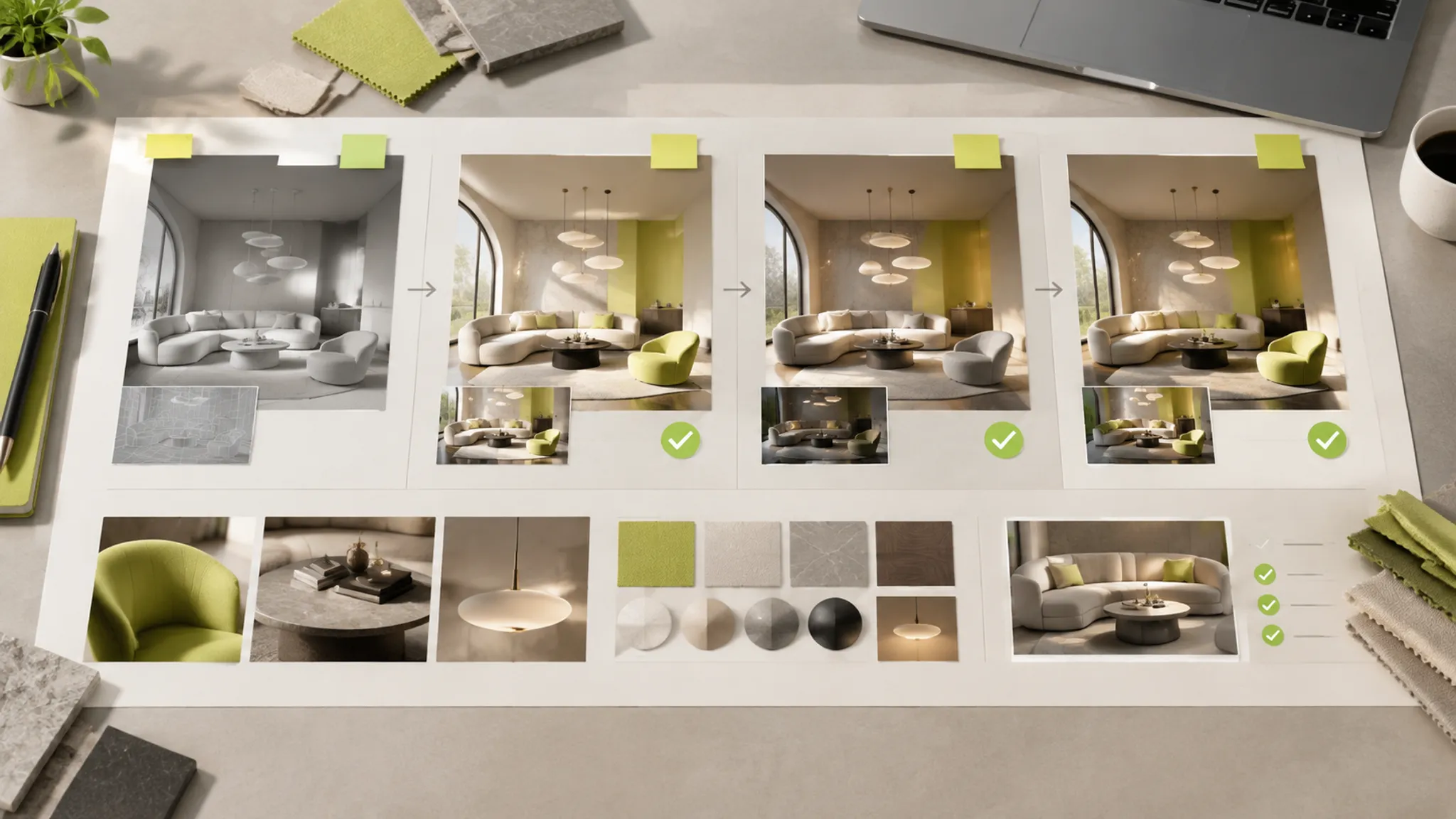
Start With the Decision, Not the Comment
Before consolidating feedback, identify the decision the review is supposed to make. A furniture review may concern the silhouette from one viewing angle, the proportion between seat and base, the placement of a visible joint, or the object's relationship to the room.
A lighting review may focus on fixture height, component placement, the relationship between shade and mounting point, the direction of visual emphasis, or the contrast between metal, glass, textile, ceramic, or polymer elements.
A comment such as “make it pop” does not identify the decision. It may refer to contrast, edge response, lighting emphasis, finish, scale, or composition. Translate it into a bounded question:
Is the fixture difficult to read because the shade and background have similar values, or because the component placement is visually unclear?
That question separates a presentation adjustment from a possible form revision. The next review can address the relevant issue without changing unrelated decisions.
Build One Render Revision Brief
Conflicting feedback should be compared against the approved brief before it becomes a revision. The loudest comment is not automatically the controlling instruction.
| Record field | What it should identify |
|---|---|
| Controlling version | The exact render or scene state under review |
| Comparison view | The camera, crop, angle, or before-and-after pair |
| Visible location | The area, edge, component, or room relationship being discussed |
| Requested change | The specific visual adjustment |
| Reason | The brief criterion or review concern behind the request |
| Relevant criterion | Silhouette, proportion, scale cue, placement, contrast, grain, sheen, or another named cue |
| Dependency | A sample, drawing, supplier record, technical review, or later decision affected |
| Owner and status | The responsible participant and whether the item is open, clarified, revised, accepted, deferred, or superseded |
| Approval note | The decision made and the version to which it applies |
The controlling version matters because a comment can become detached from the image that prompted it. A note about a rear leg may refer to one camera, while a later reviewer interprets it from another. Version-linked comments can preserve that context in a review platform, marked-up PDF, or other controlled record.
Compare Criteria Before Choosing a Direction
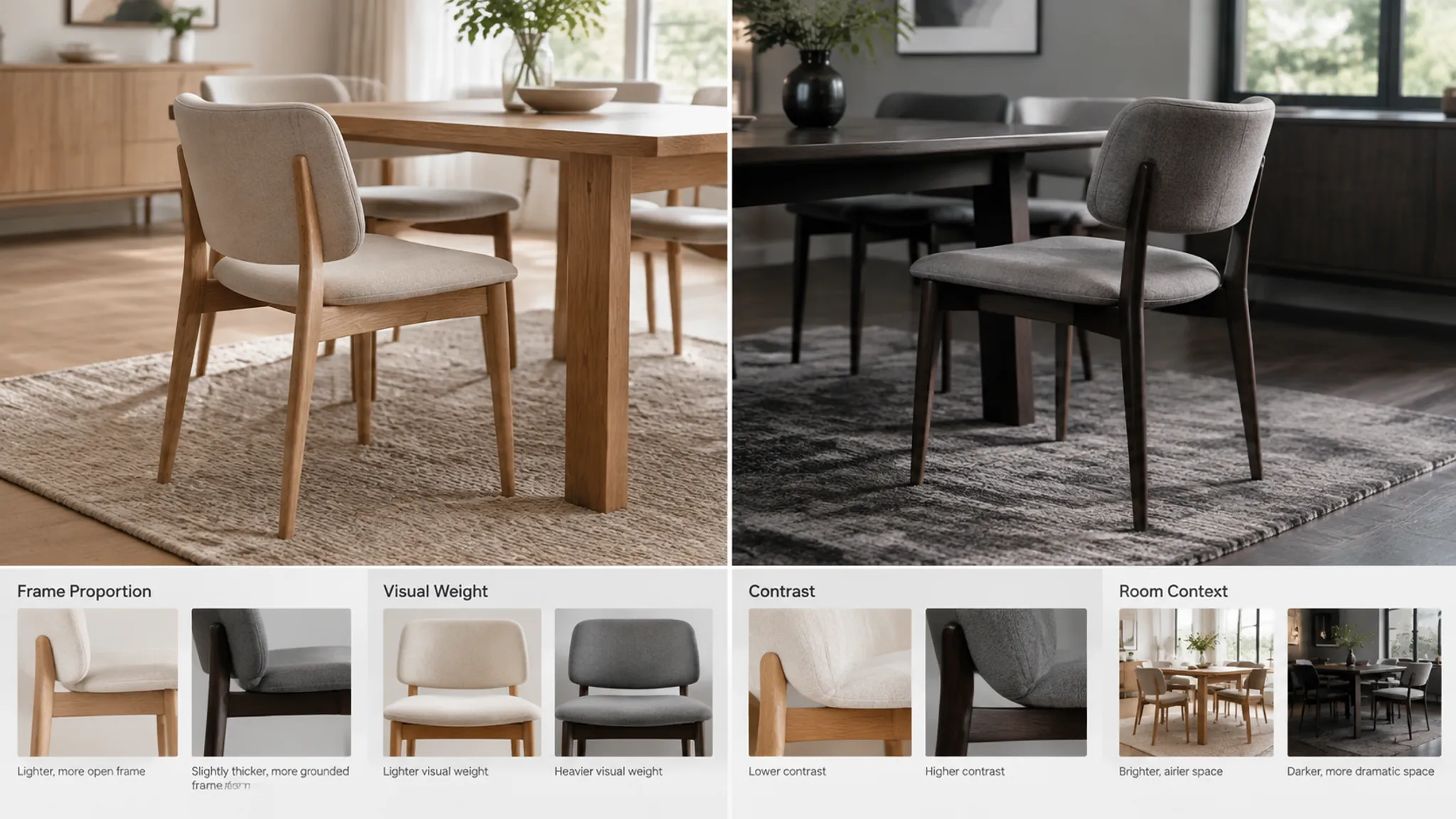
Suppose one reviewer asks for a lighter, more delicate chair frame. Another asks for a stronger presence in the room. Those comments are not necessarily mutually exclusive. They may address different criteria.
- The first may be reacting to frame thickness or edge visibility.
- The second may be reacting to scale, contrast, or the chair's relationship to the table.
- One may concern the object in isolation.
- The other may concern the object in room context.
Name the directions and compare them against the same view:
| Direction | Visible change | Criterion to review | Dependency |
|---|---|---|---|
| A | Reduce the apparent frame thickness | Silhouette and visual weight | Construction detail requires confirmation |
| B | Retain the frame and increase contrast against the room | Separation and room context | Finish or lighting direction may change |
This exposes when a team is trying to solve a form problem through lighting, or a contrast problem through geometry. It also turns “make it feel lighter but more present” into a reviewable choice.
Use Staged Render Review for Different Decisions
A staged render review is useful when each image has a limited decision purpose. The stages below are practical review frames, not a universal industry standard. Form, material direction, lighting, and final presentation should not be treated as one undifferentiated approval.
Form and Placement Checkpoint
The first checkpoint keeps attention on form, proportion, component placement, contact points, and scale cues. A lower-detail or neutral render can help reviewers inspect:
- Silhouette from the intended view
- Relative thickness and spacing
- Contact between legs, floor, wall, or supporting surfaces
- Placement of switches, shades, shelves, handles, or visible hardware
- Apparent scale in relation to the room
- Alignment with nearby furniture or architectural features
Surface detail should not obscure an unresolved proportion. A polished finish can draw attention away from a base that still appears too wide, a pendant that hangs at the wrong visual height, or a table whose scale cue conflicts with surrounding seating.
The render shows an apparent relationship. It does not confirm the physical joint, load path, mounting method, or installation condition. Those questions belong in drawings, specifications, samples, and qualified technical review.
Approval note example:
Version R03 supports the revised table-to-chair proportion from the dining-room view. Confirm the leg connection and final dimensions separately. Material direction remains open.
This records a visual decision without expanding it into production approval.
Lighting and Material-Direction Checkpoint
Once the main form and placement are sufficiently defined for the current review, compare lighting and material direction separately.
For furniture, inspect the cues that carry the finish decision:
- Grain direction and scale
- Weave density
- Roughness
- Sheen
- Edge response
- Colour or finish variants
- Contrast between adjacent materials
For lighting, inspect the apparent illumination direction, bright and dark areas on the fixture, shade translucency, highlight behaviour on metal or glass, visual emphasis of the light source, and the relationship between the fixture and its background.
A render can suggest how a surface is represented under one lighting setup. It cannot substitute for a material sample when the decision depends on actual grain, weave, translucency, sheen, colour variation, or edge response.
When a reviewer says “the metal looks too flat,” the brief should identify whether the concern is insufficient highlight contrast, an incorrect roughness cue, a finish variant that is too dark, a camera or light position that hides the edge, or a mismatch between the fixture and the room context. These lead to different revisions. Do not rewrite a material request as a generic realism request.
Approval note example:
Version R05 supports the brushed-metal direction and warmer room emphasis. The render remains a visual comparison only; confirm the selected finish against the material sample and supplier record.
Final Presentation Checkpoint
The final presentation checkpoint asks whether the delivered image reflects the decisions already recorded. Review whether:
- The approved silhouette is preserved
- Component placement remains consistent
- The selected finish direction is represented
- The room context still provides a useful scale cue
- The camera and crop support the intended comparison
- Lighting emphasis has changed the apparent hierarchy
- Unresolved questions are labelled rather than hidden
A final render can be visually consistent with an approval record while still requiring technical, production, installation, or rights review. Final presentation is a checkpoint for communication, not a declaration that every downstream question has been settled.
Translate Vague Render Feedback
Stakeholder language often arrives as mood, shorthand, or emotional reaction. That language reveals a response, but it is not yet an actionable instruction.
“Make It Pop”
Ask what should become more visible and by which criterion. The request may concern stronger separation from the wall, more contrast between shade and background, greater sheen, increased lighting emphasis, or more space around the object.
The revision brief should name one bounded change, such as “increase contrast between the ivory shade and the rear wall.” That is more reviewable than “make it pop.”
“It Looks Good”
This may indicate general approval, but it does not identify the approved version or decision. Convert it into a version-bound note:
Version R06 is accepted for silhouette and room placement. Finish selection and mounting details remain open.
Written confirmation should state what was accepted, against which view, and what dependent work can proceed. It should not imply that the concept is ready for manufacture or installation.
“The Scale Feels Wrong”
Scale is inferred through relationships. Identify the cue creating the concern:
- The lamp base appears too large for the table surface.
- The pendant appears too low relative to the dining setting.
- The chair seat appears too small beside the table.
- The sideboard appears too shallow compared with the wall and nearby object.
- The fixture's component placement conflicts with the room's apparent proportions.
Record the intended comparison view. A scale comment without a named view can produce contradictory revisions across different cameras.
“The Material Is Not Right”
Separate appearance from material identity. Ask whether the issue concerns grain, weave, roughness, translucency, sheen, edge response, colour, finish variant, or the way lighting reveals the surface.
The reference record identifies the intended material direction, but the sample is still needed when the decision depends on physical appearance or supplier-specific variation.
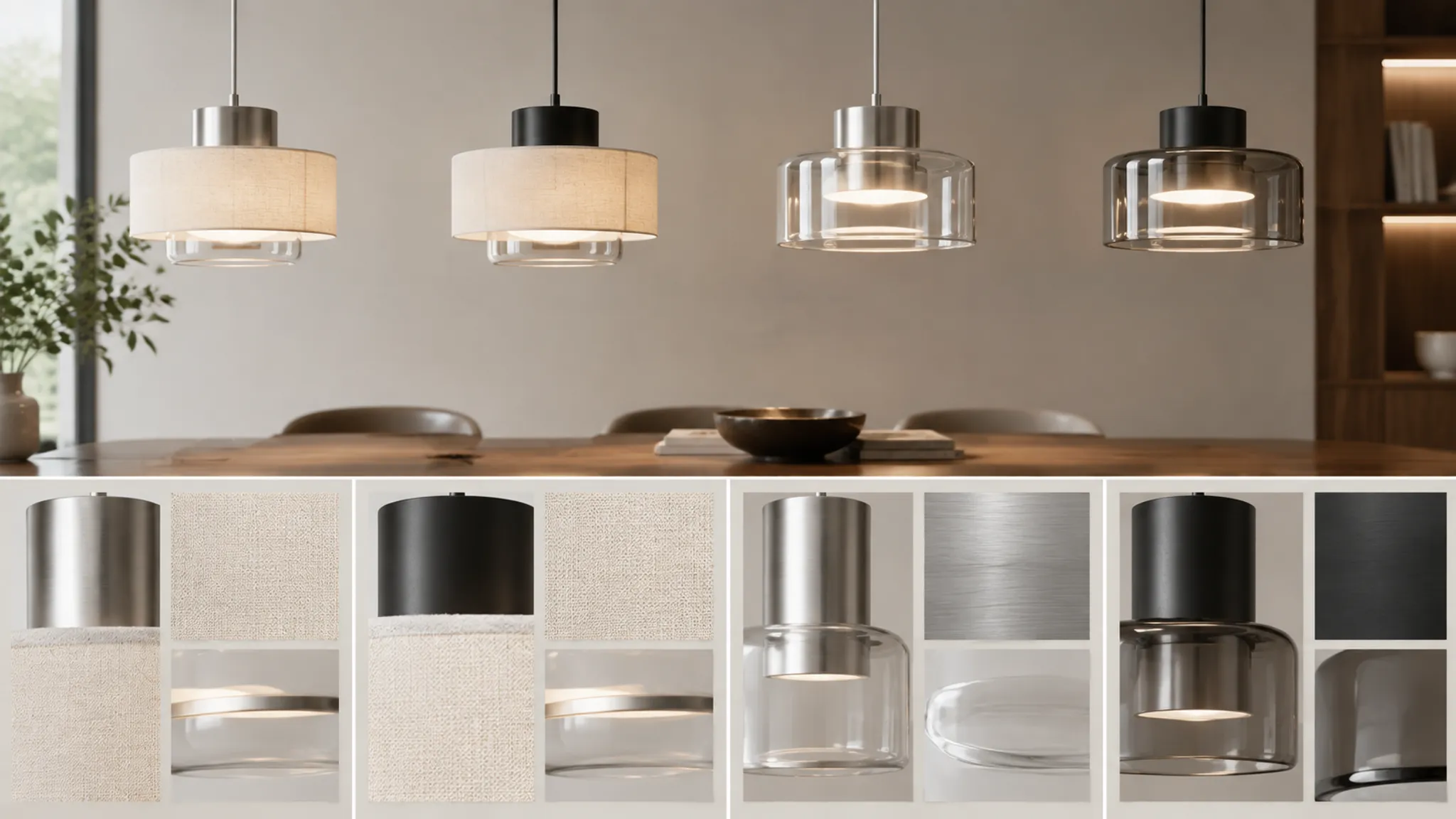
Use Before-and-After Render Comparisons
A before-and-after comparison should isolate the requested change. If form, camera, lighting, and finish all change simultaneously, reviewers may not know which adjustment addressed the original concern.
Use a comparison pair when a component has moved, a proportion has changed, a finish variant is being considered, the camera remains fixed while the object changes, or the room context remains fixed while lighting emphasis changes.
Label each image with its version and direction. Keep the view, crop, and scale cue stable where possible.
| Comparison | What it tests | What it cannot establish |
|---|---|---|
| R03 versus R04 | Base proportion from the front three-quarter view | Structural adequacy or final dimensions |
| Finish A versus Finish B | Apparent sheen and contrast under the same lighting | Exact physical finish match |
| Lighting setup 1 versus setup 2 | Emphasis on shade and tabletop | Electrical performance or installation suitability |
| Room context A versus room context B | Apparent scale and collection relationship | Retail response or commercial outcome |
The comparison is strongest when the brief states the criterion before the images are reviewed. Otherwise, reviewers may drift toward general preference.
Keep Comments Linked to Approval States
A controlled revision record does not require a particular software platform. It requires traceability. Each comment should remain connected to a version identifier, view or camera, marked location, named component, requested action, reply or clarification, status, and later decision.
Threaded clarification is useful when a comment contains an unresolved assumption. “Raise the pendant” could mean raising the entire fixture, shortening the visible stem, changing the camera, or adjusting the room reference. The reply should settle the intended change before the revision is issued.
Useful status labels include:
- Open
- Needs clarification
- Accepted for revision
- Revised
- Accepted for this checkpoint
- Deferred
- Superseded
- Requires technical review
Avoid using “approved” without specifying its scope. An accepted lighting direction is not necessarily an accepted fixture construction. An accepted finish direction is not an exact material match. A final image approval is not a rights determination.
Record Dependencies Before Handoff
Review decisions do not all have the same dependency weight. A form or placement decision may affect room composition, scale cues, the relationship between products, lighting emphasis, and the interpretation of a material surface.
A finish decision may affect the reference record, material sample, supplier information, highlight behaviour, and consistency across a product collection. A presentation decision may affect the selected camera, crop, room context, and comparison with other collection images.
Record the dependency when it changes the next action. “Do not finalize the finish comparison until the camera remains fixed” is more useful than a general note about coordination.
The available research supports cautious language around staged checkpoints, comparison, version traceability, material and appearance review, and collaborative annotation. It does not establish a universal approval sequence or demonstrate reductions in time, cost, conflict, revision rounds, or production risk.
Prepare the Production Handoff
The handoff begins when the visual decision is specific enough for another discipline to assess its own requirements. Include:
- The controlling render version
- The accepted visual decisions
- The unresolved visual questions
- The relevant drawings or specifications
- The material or finish references
- The requested technical or production checks
- The responsible participant
- The status and required response
- Any change that expands scope or affects a previous approval
Use precise language at the boundary:
- The render shows the apparent placement.
- The brief specifies the intended proportion.
- The reference record identifies the proposed finish direction.
- The material sample is still needed.
- The drawing requires review.
- The installation condition requires confirmation.
- Rights status requires a separate determination.
A technical reviewer may need to assess structure, mounting, electrical conditions, installation, compliance, or manufacturability. A supplier or material specialist may need to confirm finish behaviour and availability. A rights holder or appropriate rights reviewer may need to address reference use. These are separate handoffs, not hidden conclusions inside the render approval.
A Practical Review Sequence
- Identify the controlling brief. Record the intended product, view, room context, and criteria under review.
- Lock the comparison view. Use a stable camera, crop, or before-and-after pair for the active question.
- Review form and placement. Check silhouette, proportion, component placement, contact points, and scale cues.
- Consolidate feedback. Group comments by visible criterion and resolve conflicts against the brief.
- Issue one revision brief. Name the requested change, reason, dependency, owner, and status.
- Review lighting and material direction. Separate illumination, surface cues, finish variants, and room emphasis.
- Record checkpoint approval. State which version and decisions are accepted, deferred, or still open.
- Review final presentation. Confirm that the delivered image reflects the documented visual decisions.
- Prepare the handoff. Attach drawings, samples, supplier records, rights questions, and technical requests where required.
This is a coordination model, not a claim that every team should use identical gates. Its value lies in keeping the decision type visible at each stage.
Questions Before the Next Revision
- Which version generated the comment?
- Which view or crop shows the problem?
- Is the concern about form, placement, scale, material cue, lighting, or presentation?
- What visible change is being requested?
- Which brief criterion does the change support?
- Does the request conflict with a previously accepted decision?
- Does the change affect a sample, drawing, supplier record, or technical review?
- Who owns the response?
- What remains inferred from the image?
- What requires confirmation outside the render?
- What exactly will the next approval note accept?
Use the render to organise visible design decisions, use the revision brief to control change, and use qualified participants and stable records for the questions the image cannot settle. The next responsible action may be a clearer request, a fixed comparison view, a material sample, or a separate technical review.
Sources
- Progressive render checkpoint workflows in production
- Towards a Co-creative System for Creating, Suggesting, and Assessing Material Textures for 3D Renderings During Design Reviews in Industrial Design
- State of the Art in Artistic Editing of Appearance, Lighting and Material
- Towards Advanced Collaboration Systems for Design Reviews in Product and Production Development
- Engineering and Construction: 3D Model Review and Tagging System
- A Framework Enabling Real-time Multi-user Collaborative Workflow in 3D Digital Content Creation Software
- LightGuider: Guiding Interactive Lighting Design using Suggestions, Provenance, and Quality Visualization